Self-hosted · Open source · MIT

Forms you own. Answers you keep.

FormCraft is a self-hosted form builder. Build forms by drag-and-drop, share a link or a QR code, and read every response in a table with charts. It runs on your server, in English, Arabic and Tamil, light or dark.

curl -fsSL https://raw.githubusercontent.com/shatheitguy/formcraft/main/install.sh | bash
Docker · amd64 + arm64 SQLite or PostgreSQL EN · العربية · தமிழ் Light + dark Unraid template
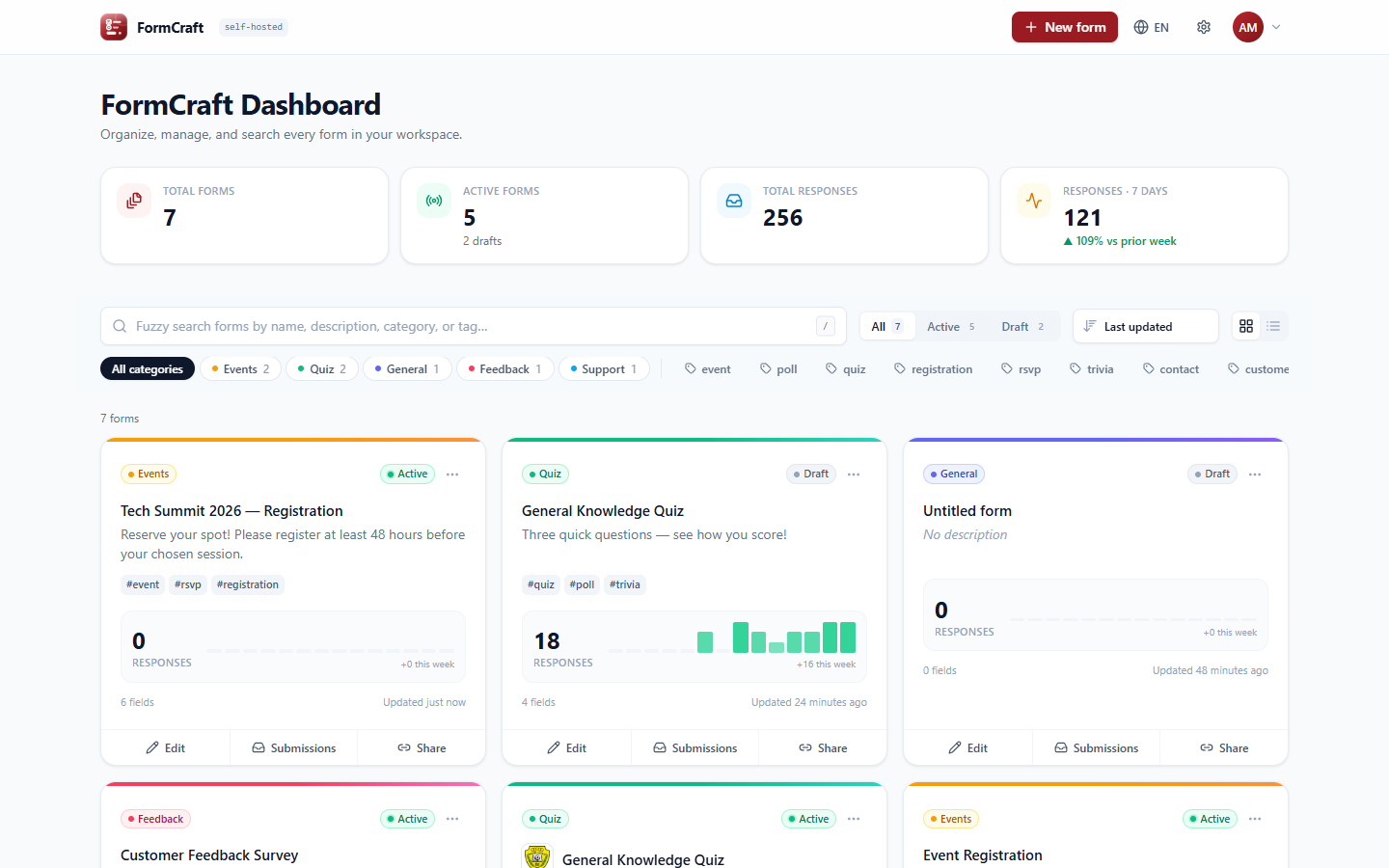
FormCraft dashboard with form cards, response counts and sparklines
The product

What you actually get.

Every screen below is the real app, not a mock-up.

Drag-and-drop builderTen field types, a properties panel, autosave, undo and a live preview.
Submissions tableSearch, filter by date or by answer, sort any column, open a response, export CSV.
InsightsAnswer distributions, rating histograms and an automatic Net Promoter Score.
ShareA unique link, a dedicated port with a built-in port test, a custom domain and a QR code.
TranslateEvery text side by side with the original, with progress per language.
Dark mode, in TamilThe whole app follows the device's theme, or the one each user chooses.
Features

Everything a form needs, nothing it doesn't.

Built for teams who want Google-Forms simplicity without sending their data to someone else.

Builder and templates

Text, paragraph, email, phone, choices, dropdown, date, rating and scale. Start from contact, feedback, event or quiz templates.

Quizzes with scoring

Mark the correct answers, give each one points, and show respondents their score when they submit.

Submissions and insights

A filterable table, per-question charts, NPS and CSV export. Choice answers are stored the same way in every language.

Users and roles

Admins, editors and viewers. Give each person all forms or only the ones they need, read-only or editable.

Email and Telegram alerts

SMTP (with Gmail and Outlook presets) and your own Telegram bot. Each user picks where alerts go and for which forms.

Links, ports, domains

Every form gets a unique link and its own port, served without a restart. Point a Cloudflare Tunnel at it and add a QR code.

Branding

Workspace name, logo and accent colour, plus a logo, cover image and colour for each form. Your own footer text, too.

Full system backups

One file with every table and uploaded image. Restore previews the file, takes a safety snapshot first, and also moves SQLite to PostgreSQL.

Private by design

Hashed passwords, throttled logins, secrets kept server-side, uploads checked by file signature. No telemetry, no cloud.
Languages

One form, two languages. Switch at any time.

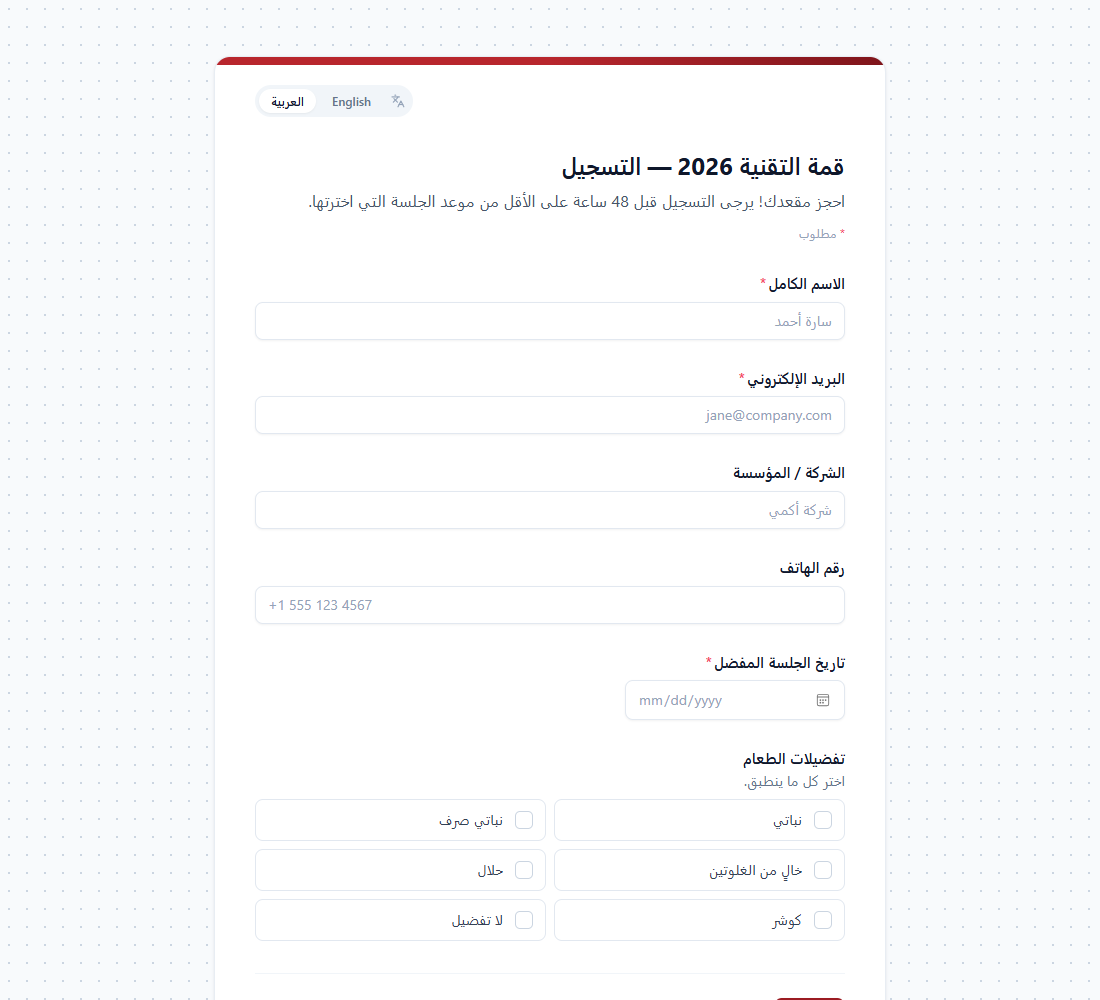
The app is fully translated into English, Arabic and Tamil, and Arabic turns every screen right-to-left. Forms can be offered in several languages at once.

  • 1Pick the languages in the form settings, then fill in the Translate tab. Anything you leave empty falls back to the original.
  • 2Respondents switch language while filling in. Their answers stay, and the errors and confirmation follow the new language.
  • 3Reports stay consistent. Every response records its language, and choice answers group together whichever language they were given in.
  • 4Set a language in the link with ?lang=ar. Otherwise the visitor's browser language is used.
A registration form shown in Arabic, right-to-left
Database

Bring your own. Or don't.

The installer asks. The tables build themselves on first start and update themselves on every upgrade.

recommended

Install PostgreSQL for me

A separate postgres:16 container with its own volume. The password is generated unless you type one. Adminer is optional.

Use my own PostgreSQL

Enter host, port, database, user and password. The installer tests the connection before it writes anything.

Embedded SQLite

One container and one file on a volume. Nothing else to run, which suits personal use and small teams.

Install

One line, then open your browser.

The installer checks Docker and asks three questions: database, ports and demo data. It writes .env, pulls the image and starts FormCraft. Open the address and create your admin account; there is no default password.

  1. Linux or macOS
    curl -fsSL https://raw.githubusercontent.com/shatheitguy/formcraft/main/install.sh | bash
  2. Windows (PowerShell)
    irm https://raw.githubusercontent.com/shatheitguy/formcraft/main/install.ps1 | iex
  3. Update later
    docker compose pull && docker compose up -d
Image tagUse it for
latestFollows main. Works with SQLite and PostgreSQL. What the installer uses.
1.0.0Pinning a known-good release in production.

Unraid: the template is in shatheitguy/unraid-templates, with my other Unraid templates. It uses SQLite in /mnt/user/appdata/formcraft with PUID 99 and PGID 100.